

Site actions
This page covers the Actions tab — where you deactivate, upgrade, transfer, or delete a site. Open your site and click the Actions tab to find them.
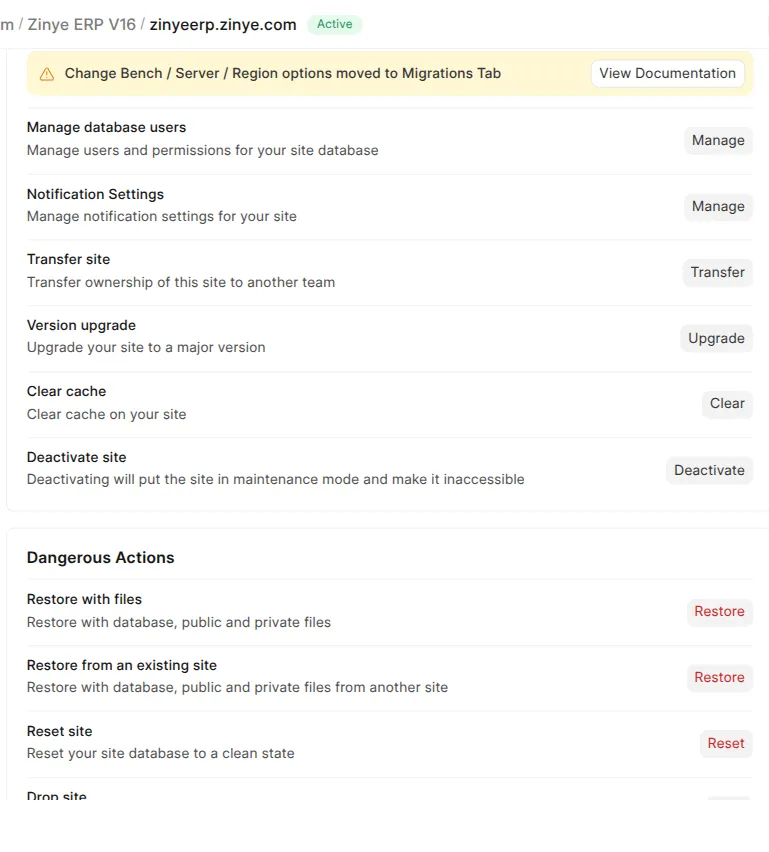
General actions
Section titled “General actions”| Action | What it does |
|---|---|
| Deactivate site | Puts the site into maintenance mode so no one can reach it. You can reactivate it later. |
| Version upgrade | Upgrades the site to a newer major version. |
| Clear cache | Clears the site’s cache — a safe first thing to try if a page looks out of date. |
| Transfer site | Hands ownership of the site to another team. |
| Manage database users | Advanced: manage database access for the site. |
| Notification Settings | Choose what you’re notified about for this site. |
Dangerous actions
Section titled “Dangerous actions”These are grouped separately because they change or remove your data. Each asks you to confirm first.
| Action | What it does |
|---|---|
| Restore with files | Restores the site from a backup (database + files). |
| Restore from an existing site | Copies the data from one of your other sites onto this one. |
| Reset site | Wipes the site’s database back to a clean, empty state. |
| Drop site | Permanently deletes the site and all its data. |