

Plans & billing
This page explains how plans and charges work on Zinye Cloud, how to change a site’s plan, and where to find your invoices.
How plans work
Section titled “How plans work”- Each site has its own plan, billed monthly. If you run two sites, each has its own plan.
- New sites start on a free trial — fully working, no charge — so you can try things first.
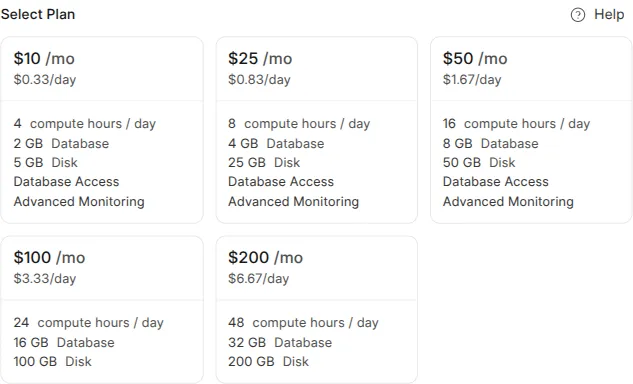
- Plans differ by how much computing power, database, and storage the site gets. You choose a plan when you create a site, and you can change it any time.
Change a site’s plan
Section titled “Change a site’s plan”- Open the site and stay on the Overview tab.
- Next to Current Plan, click Upgrade.
- Choose the new plan and confirm.
The change takes effect right away. You can upgrade when you need more power, or move to a smaller plan if you need less — nothing is locked in.
Your billing area
Section titled “Your billing area”Click Billing in the left menu to manage money matters across your whole account:
| Tab | What’s there |
|---|---|
| Overview | Your recurring charges and the next charge date. |
| Invoices | Every invoice, ready to view or download. |
| Balances | Account credit, if you’ve added any. |
| Payment Methods | Your cards — see Add a payment method. |
When your trial ends
Section titled “When your trial ends”Before a site’s free trial ends, make sure a payment method is on file. When the trial ends, the plan you picked for that site starts billing automatically, and the site keeps running without interruption.