

Getting help
This page shows you where to get help when you need it.
Help menu
Section titled “Help menu”Click Help at the bottom of the left menu. It gives you:
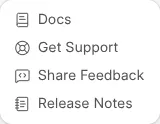
- Docs — this documentation.
- Get Support — contact the Zinye support team with a question or problem.
- Share Feedback — tell us what could be better.
- Release Notes — see what’s new.
Contact support directly
Section titled “Contact support directly”You can also reach the team without opening the dashboard:
- Email support@zinye.com — the fastest way to get help with your sites, billing, or apps.
- Web form — fill in zinye.com/contact and we’ll get back to you.
- Sales or plan enquiries — email sales@zinye.com or use zinye.com/contact.
Check service status
Section titled “Check service status”If something seems slow or unreachable, click Status in the left menu (or visit cloud.zinye.com/dashboard/status). It shows whether Zinye Cloud is running normally or working through an issue.
Before you contact support
Section titled “Before you contact support”You’ll get help faster if you mention:
- The site address affected (for example
yourname.zinye.com). - What you were trying to do, and what happened instead.
- Any error message you saw (a screenshot helps).
Advanced features
Section titled “Advanced features”The Benches, Servers, and Dev Tools (Log Browser, DB Analyzer, SQL Playground) sections are built for technical users and developers. You don’t need them for normal use. If you think you do, contact support — email support@zinye.com or use the Help → Get Support menu — and they’ll guide you.